
Differences between PETG and PLA in FDM 3D Printing - LONGER
Differences between PETG and PLA in FDM 3D Printing

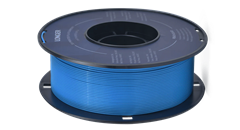
In general, the choice between PETG and PLA depends on the specific needs of the 3D printing you intend to do. If you want greater impact resistance, flexibility, and chemical resistance, PETG may be your best choice. Instead, if you want a cheap, easy-to-print, and biodegradable material, PLA may be the best choice. In particular, PETG is a very resistant and flexible filament, ideal for printing large-volume objects and resistant to the effects of chemicals such as acids and alkalis; moreover, compared to PLA, PETG is more resistant to heat and less fragile, so it is great for making prints that will be placed outside and exposed to sunlight.

PETG is a copolymer that combines the properties of PET and glycol. The addition of the latter reduces the problems of overheating of PET and, consequently, increases its resistance. For these reasons, PETG is one of the most commonly used filaments and is an excellent choice for printing parts subjected to mechanical stress and heat; moreover, PETG has an almost absent odor during printing, even if it is a material derived from petroleum and therefore not biodegradable.

PLA is a lactic acid polymer and was the second bioplastic marketed and sold on a large scale. It derives from the milling of corn and is to be considered biodegradable, even if it requires precise conditions to trigger the decomposition process. PLA has some advantages over PETG, such as greater ease of printing, greater rigidity, better surface quality, and lower cost, although it fears heat and weathering.

Therefore, summarizing the advantages of PETG over PLA, here is a list of technical characteristics:

  • Impact resistance: PETG is more impact resistant than PLA. This means that PETG is less likely to break during use.
  • Flexibility: PETG is more flexible than PLA, which makes it better for printing parts that require a certain amount of flexibility or need to resist warping.
  • Chemical resistance: PETG has higher chemical resistance than PLA, which makes it more suitable for printing parts that come into contact with chemicals or solvents.
  • Ease of printing: PETG is easier to print than other materials such as ABS and nylon but offers very similar characteristics to these. However, compared to PLA, PETG is more difficult to print.
  • Temperature resistance: PETG has greater temperature resistance than PLA and can withstand higher temperatures without deforming or losing its shape.
  • Weather resistance: PETG is more weather resistant than PLA, which makes it more suitable for printing parts for outdoor use.
  • UV light resistance: PETG has greater resistance to UV light than PLA. This means that PETG is less susceptible to yellowing or degradation caused by exposure to UV light.
  • Dimensional tolerance: PETG has a higher dimensional tolerance than PLA. This means that PETG molded parts can have higher dimensional accuracy than PLA.

In general, PETG is a versatile and durable material that can be used for a wide range of applications. However, like any material, it also has some disadvantages, such as the need to use higher printing temperatures than PLA and a greater propensity to create stringing filaments. In addition, PETG may require more attention in the preparation of the print bed and in the calibration of the printer than PLA; however, if you choose PETG and take all the precautions seen in a previous article, the printing result can be of high quality.

In conclusion, both materials have their advantages and disadvantages, and the choice depends on the specific needs of the project. When choosing between PETG and PLA, it is important to consider the strength, flexibility, chemical resistance, ease of printing, heat resistance, weather resistance, durability, availability, cost, sustainability, color, appearance, and specific applications of the project you want to achieve.

https://eu.longer.net/products/lk5-pro-fdm-3d-printer

By Software | March 28, 2023
PETG 3D Printing in FDM - LONGER
PETG 3D Printing in FDM

Longer FDM 3D printers are capable of printing PETG with high quality. This type of material offers many advantages, as it can be printed as easily as PLA but is as durable as ABS.

To 3D print the PETG, you need to make sure that the 3D printer is set up correctly to print the PETG. This includes material selection, nozzle and hotbed temperature, extrusion speed, and other settings related to print quality. In addition, when printing PETG, it is recommended to always keep an eye on the press to make sure that everything goes according to plan and that there are no problems.

The recommended parameters for printing with PETG in 3D may vary depending on the 3D printer, the type of PETG purchased, and the project you want to carry out. However, here are some common printing parameters for PETG:

  • Extrusion temperature: 220°C – 250°C
  • Bed temperature: 70°C – 90°C
  • Print speed: 40 mm/s – 80 mm/s
  • Fan speed: 0% - 30%
  • Retraction distance: 4 mm–8mm
  • Retraction speed: 30 mm/s – 40 mm/s
  • Layer height: 0.2 mm

Keep in mind that these are only basic values, and small adjustments may be necessary to achieve the best results based on your specific needs. In fact, there are a few other factors that could affect printing with PETG:

  • Adhesion to the bed: it may be useful to use an adhesive solution to be affixed to the glass or a latex/PEI top to increase the adhesion of the material to the printing bed.
  • Fan cooling: it is important to keep the fan off or at a minimum to cool the newly extracted material, as cooling too fast can cause warping and weakening of the structure.
  • Extrusion: It is important that the extruder is able to extrude a constant amount of material during printing, so the temperature must be set high enough.
  • Bed leveling: A well-leveled bed can ensure that the model has an even base and that there are no detached parts during printing.
  • Speed: Printing speeds that are too fast can cause warping or adhesion effects. Adjust the print speed to achieve a balance between quality and print time.
  • Temperature: Extrusion temperature can affect material properties, such as flexibility and strength. Make sure the temperature is high enough to ensure good extrusion but not too high to cause other problems.
  • Print bed cleaning: Make sure the print bed is clean and free of dust or other things that could affect material adhesion.

These are just some of the factors that can affect printing with PETG. It is advisable to do some tests to understand which combination of parameters works best for your 3D printer and for your specific project. In addition, it is important to use a quality material and store it correctly, since PETG can be sensitive to changes in temperature and humidity; therefore, it is necessary to store the filament in an airtight container along with a silica bag to maintain the quality of the material. In general, the key to successful printing with PETG is to experiment and optimize printing parameters according to the specific needs of the project. However, once you have learned how to 3D print PETG, this is a material that allows you to create resistant, flexible, and quality objects. For best results, it's important to follow recommendations on printing parameters, such as temperature, speed, and media usage, and pay attention to design and post-processing details.

https://eu.longer.net/products/lk5-pro-fdm-3d-printer

By Software | March 28, 2023
Hotend Replacement for Longer FDM 3D Printer - LONGER
Hotend Replacement for Longer FDM 3D Printer

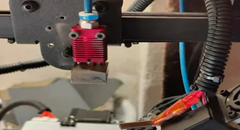
While using an FDM 3D printer, you may need to replace the hotend. In fact, a little space between the heatbreak and nozzle, or a failure of the heatsink fan, or any other type of problem could cause a clog that prevents normal extrusion during printing, and the only way to repair the fault is to disassemble or replace the hotend.

Replacing the hotend is an easy procedure but one that requires the utmost attention.
In order to proceed with the replacement, follow these steps.

Disassembly

1) Unscrew the screw that holds the thermistor in place and remove the thermistor and temperature sensor

Unscrew the screw that holds the thermistor in place and remove the thermistor and temperature sensor

2) Disassemble the Hotend, then unscrew the screw that holds the Heatsink in place and remove the heatsink.

Disassemble the Hotend, then unscrew the screw that holds the Heatsink in place and remove the heatsink.

3) Remove the PTFE tube from the heatbreak.

4) In case the end of the PTFE tube is damaged, cut the damaged part, taking care to make a vertical cut at 90 degrees; an inaccurate cut will cause molten material to leak during printing, causing a new clog. In order to proceed to a precise cut, it is recommended to use a "PTFE cutter" available as an accessory for 3D printing or you can proceed to print an STL file by searching on Thingiverse for "PTFE cutter."

Replacement

1) Screw the Heatbreak correctly into the heatblock.

Screw the Heatbreak correctly into the heatblock.

2) Screw the Nozzle into the Heatblock

3) Install the Heatsink

4) Mount the Hotend on the 3D printer

5) Unscrew a little the Nozzle (about half a turn), then insert the PTFE tube until it hits with the nozzle.

6) Insert the thermistor and the temperature sensor into the block, fixing them with the appropriate screw

7) Heat the Hotend up to 200°C, then screw the Nozzle well so that it is tight with the PTFE tube and the heatbreak.

Heat the Hotend up to 200°C, then screw the Nozzle well so that it is tight with the PTFE tube and the heatbreak

Once you have completed these steps, the new hotend will be ready to use.
The correct assembly ensures good operation and avoids new clogs due to leakage of molten material between the heatbreak and the nozzle.

https://eu.longer.net/products/lk5-pro-fdm-3d-printer

By Software | March 28, 2023
Hotends comparison - MK8 vs V6 - LONGER
Hotends comparison - MK8 vs V6

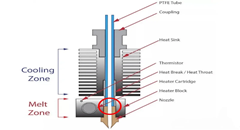
The Hotend is the part of an FDM 3D printer that deals with the melting and deposition of molten plastic material. Therefore a Hotend is composed of a Nozzle that deals with depositing the molten material, a Heatblock that deals with the melting of the material, and a Heatbreak that keeps the hot zone separate from the cold area of the Hotend. The Heatbreak can be equipped with a Heatsink, equipped in turn with a fan.

Hotends come in various shapes and sizes, however common and popular types are the Hotend MK8 and Hotend e3d V6.

Hotend MK8

The Hotend MK8 are composed of Nozzle, Heatblock, Heatbreak and Heatsink, and provide for the insertion of the PTFE tube in beat with the nozzle. This implies that the PTFE tube is inserted inside the Heatbreak, then the filament flows inside the PTFE tube and reaches the nozzle directly, without intermediate zones.

The PTFE tube, in the part in contact with Nozzle and Heatblock, tends to reach the same melting temperature set for the filament, however this is not a problem as PTFE supports temperatures up to 300 C very well, well beyond the normal printing temperatures of PLA, PETG and ABS. On the other hand, the higher the printing temperature, the greater the amount of heat that the Heatbreak must dissipate; in fact, when the heat is not dissipated properly, it tends to rise inside the PTFE causing the filament to melt in areas far from the Nozzle, resulting in obstructions that prevent the filament from passing. For this reason, it is necessary to accompany the Heatbreak with a heatsink heatsink with fan, in this way the heat passage is quickly interrupted.

The Hotend MK8 is ideal for printing most filaments, however for printing more technical materials it may be unsuitable. In fact, printing filaments that require a high temperature, such as polyamide (nylon), also require a large dissipation capacity; however, the structure of the MK8 Heatsink is not able to dissipate much heat, moreover the PTFE tube present inside the Heatbreak also begins to lose its characteristics, thus causing obstructions.

Hotend e3d V6

The Hotend e3d V6 are composed of Nozzle, Heatblock, Heatbreak and Heatsink, and provide both the insertion of the PTFE tube in batting with the nozzle and the PTFE tube in batting with the Heatbreak. This implies that the PTFE tube is inserted inside the Heatbreak, then the filament flows inside the PTFE tube and reaches the nozzle directly, without intermediate zones, or the PTFE is beaten at the entrance of the Heatbreak and the filament passes through an all-metal area before reaching the nozzle. Therefore, the Hotend e3d V6 provides two different configurations of Heatbreak, or the classic Heatbreak with PTFE or a Fullmetal Heatbreak.

The Hotend e3d V6 has an improved heatsink, with a larger dissipative surface, so it is ideal for printing most filaments, including printing more technical materials. In fact, even the printing of filaments that require a high temperature, such as polyamide (nylon), can be performed thanks to the great dissipation capacity; moreover, if the temperature is excessive for the PTFE tube present inside the Heatbreak, then it is possible to use a Fullmetal Heatbreak that does not suffer from temperature problems.

Unfortunately, due to its large size, it is often very difficult to install a Hotend e3d V6 on smaller printers, for this reason the default installation of a Hotend MK8 is often preferred, which is able to perform almost any printing option for common users with a small footprint.

https://eu.longer.net/products/lk5-pro-fdm-3d-printer

By Software | March 28, 2023
LONGER RAY 5 Newest 20W vs. 10W vs. 5W, What's the Differences? Which One to Buy? - LONGER
LONGER RAY 5 Newest 20W vs. 10W vs. 5W, What's the Differences? Which One to Buy?

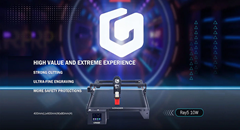
If you want to correctly engrave practically anything, you will need a laser engraver. This is because lasers are extremely precise. Because they sell the RAY5 5W and RAY5 10W engravers, the people at LONGER are a fantastic place to begin. The beam's size, power, and focal length are the key distinctions between them; nonetheless, they can engrave a significant amount of material.

If you are looking for a tool to engrave your selected object, then you should choose the model that is most suitable for your needs. Well, worry not, as we are here to tell you about the three basic types of laser engraving, their differences, and a guide to choose which one suits you according to your need. Without further ado, let's dive right in.

What Is Laser Power?

Before we learn about the three types of laser powers, let's just investigate what laser power is. The strength of the laser is what determines how much energy is taken up by the worksheet. The basic rule is that when the laser power is increased, the bend angle grows as well, reaches a peak, and then begins to fall again as the laser power is increased even further.

The higher the laser power, the more heat is absorbed, which results in a higher peak temperature and, therefore, a more incredible amount of plastic deformation at the scanned surface. This causes the bend angle to increase. After reaching its maximum, the bend angle begins to fall because of an increase in laser power.

This is primarily the result of two factors. First, the melting takes place in the region that is being irradiated at higher power, and the heat energy that is being applied is used up in the phase transformation rather than in the bending of the material. Second, when the power is increased, the peak temperature of the surface of the bottom of the vessel likewise increases.

This results in a reduction in the difference between the plastic deformation at the top surface and the bottom surface, which in turn leads to a reduction in the bend angle at greater power.

In terms of optical laser power, the vast majority of the most popular laser engravers on the market now fit into only two primary categories, namely the 5W and 10W optical power. The modules in the first category each contain a single laser diode. In contrast, the 10W modules contain ingenious optics that combine laser light from two different laser diode sources, resulting in output power that is twice as strong as that of the lower-powered modules.

What Exactly Does The "W" Stand For?

Wattage is one of the most significant aspects to consider when discussing laser cutters. It is something that you will need to specify when you first purchase the machine, and it is the factor that affects the final cutting power and speed of your project.

When the wattage rating is increased, the flow of energy also increases. When it comes to laser cutters, having a 20W laser rather than a 5W laser will enable energy to transfer at a substantially faster rate.

You can see a sequence of lasers inside the head of a LONGER RAY 5 if you crack it apart and look at the laser inside of it. However, we strongly advise against doing this. The head of the 20W laser is made up of four 5W lasers, all of which are pointed in the same direction and concentrated through the head of the laser.

Why? The purpose of this is to generate more power and more energy from a single laser beam.

Differences Between LONGER RAY 5 5W Vs. 10W Vs. 20W

The 5W, 10W, and 20W LONGER RAY 5 all share quite a few characteristics in common with one another. On the other hand, there are a comparable number of differences. Let's focus on what differentiates these machines in a series of head-to-head comparisons so that you can make the most informed decision possible about which one to purchase.

Power Of The Laser Head

Before we go any further, there is something that needs to be clarified: although the laser head is the only difference between the two, it has a significant impact on the operation of your LONGER RAY 5 laser engraver, and we will go over those differences in depth here.

Regardless of which wattage option you go with, the LONGER RAY 5 will provide you with the same framework, sensors, and attachments to use. The laser head is the only component that is different.

The LONGER RAY 5 staff refers to it as a "plug-and-play module" in their explanation. You only need two cables and ten minutes of your time to upgrade from a 5W or 10W laser cutter to a 20W model, which gives you more cutting power.

Variations in Laser Power Depend on Which Laser Head You Use and the Different Materials You Can Cut. You can improve the power of your 5W or 10W laser by purchasing a 20W module to add to it.

To put it another way, if you want a 20W, you have the option of either purchasing one specifically designed for that purpose. The only choice available to you if you want a 5W or 10W is to purchase the machine in its current state.

The benefits are significant even though the adjustment is rather straightforward. The next sections are all about the difference that the simple head swap makes.

Quickness Of Project Completion

The exact amount of time it will take to finish the project is contingent on a few different factors:

  • Quickness of the route
  • Precision in cutting depth, selection of materials, and complexity in design.
  • The depth of the etching or cut.

The remaining three of these five parameters are not dependent on your laser cutter in any way. The speed with which your laser cutter completes your job is solely dependent on the routing speed and cutting speed settings.

In this competition, the speeds of the various routes do not differ from one another. The routing speed of the 5W, 10W, and 20W is all 10000mm/min, which is far quicker than the previous generations.

Where do we stand with the cutting depth now? Here is where you'll see a significant deviation from the norm. A laser with 10W of power can cut nearly exactly twice as deep as a laser with 5W of power. When compared to the 10W, the 20W has twice the cutting depth.

This indicates that there is a theoretical difference in cutting depth that is equivalent to four times greater when going from 5W to 20W.

LONGER RAY 5 states that the difference might be very different depending on the material that is used:

When it comes to the amount of time, it will take to accomplish a project. A 20W laser cutter will get the job done the quickest, followed by a 10W laser cutter, and finally, a 5W RAY laser cutter will be the slowest.

Space For Making Cuts and Working Area LONGER RAY 5

While the chassis of each LONGER RAY 5 is the same, the cutting areas of the various configurations are also quite comparable. The LONGER RAY 5 5W and the LONGER RAY 5 10W lasers offer precisely the same cutting area, measuring 400x400mm (15.75×15.75inch).

Although the laser head on the 20W is significantly larger than that found on the 10W, the cutting area is marginally reduced. The cutting area for a 20-watt laser is 375×375mm (14.76×14.76 inch).

Although the difference isn't huge, it's nevertheless significant enough to indicate that the 5W and 10W laser cutters have a little advantage in this category.

Alternatives To Materials(Cutting Capability)

One further aspect of the topic that is connected to laser power is the many kinds of materials that can be worked with. While attempting to engrave or cut certain materials, significantly greater force and forcefulness are required.

You can work with a greater selection of materials when you have a 20W. You can also work with more substantial materials, which opens even more possibilities for the kinds of projects you can develop.

The Ray5 20W comes equipped with a powerful laser module with a 20W output. Also, this machine features the most recent generation of laser enhancement technology, which increases its capacity for cutting. It can cut through 0.002 inches (0.05 mm) of stainless steel, as well as 0.59 inches (15 mm) of pine wood and 0.31 inches (8 mm) of acrylic in a single pass.

Because of recent advancements in compressed laser technology, the laser spot may now be as small as 0.08*0.1mm2, making it possible to engrave artwork with thinner lines, clearer texture, and more attractive details. And the air-assisted interface is reserved, which allows for a wide variety of air pumps to be easily matched up with more hygienic surfaces.

While utilizing the 5W cutter, metal, ceramic, and stone become a great deal more challenging to work with, and in all honesty, the 5W power setting is more commonly used for engraving than it is for cutting. When utilizing a 5W or 10W laser cutter, most people adhere to cutting materials made of All Wood, Paper, Plastic, Leather, PCB Board, Aluminum Oxide, Non-Reflective Plating, And Lacquered Metal.

Think about getting the 20W laser if you wish to work with a variety of various types of materials. For the purposes of our projects, we have successfully cut through even the denser woodlands.

Precision

What should you do if you need to draw lines on a component that are extremely thin and accurate? In this scenario, we strongly advise you to avoid using the 20W laser head, even though the risk is still relatively low.

The spot size of the 20W laser is 0.08×0.10mm. Imagine that the laser spot is the point at which a laser pointer is pointed. If the RAY uses this laser pointer to cut, you will want the tip to be as small as it possibly can be.

The laser spots of the 5W are 0.08×0.08mm, and the 10W are 0.06×0.06mm lasers. The laser spot of the 20W laser is significantly larger.

So, if you require an accurate component, you should stick to either the 5W or the 10W.

Different Engraving Capability

Pieces can also be engraved with this type of laser cutter, which is another useful function of these machines. A small amount of material is removed from the top surface to produce designs via engraving. Because engraving does not go as deep as cutting, the power required is not as significant.

The 5W RAY's capacity to engrave is significantly improved thanks to a smaller laser point and higher precision than its predecessor. Because the component only needs one pass with the laser, and the routing speed is the same across the board for these three possibilities, the 5W is the one that should be chosen.

If you need to engrave and cut the same object, going with the 10W laser might be the best choice for you. It possesses an excellent equilibrium of slicing force and accuracy.

Make Colourful Creations

The ability to generate colorful engravings on metal is a special capability that is exclusive to the 20W LONGER RAY 5 and cannot be found on any other machine. What is the mechanism behind this? Because of the increased power provided by the 20W laser, it is capable of oxidizing metal at a variety of rates. It's hard to believe when you see it in person.

Altering the laser's power causes the metal's oxidation to occur at varying rates, ultimately producing a variety of colors. It is effective on brass, copper, stainless steel, and titanium in addition to aluminum. The only difference is the range of colors that are available to you (which depends on the metal type).

Lasers with 5W and 10W outputs are not powerful enough to accomplish this task. You'll need the 20W model if you wish to create vivid engravings on metal.

Pricing LONGER RAY 5 Laser, Available In 5W, 10W, And 20W.

What should I expect to pay for this? The distinction is not as bizarre as it may initially appear to be:

  • LONGER RAY 5W: $299.99
  • LONGER RAY 10W: $449.99
  • LONGER RAY 20W: $899.99

These are currently on discount. Hence it's high time to make a purchase.

What Different Material Can Different Laser Power Cut Or Engrave?

Cutting using a laser can be done on a wide variety of materials, including but not limited to wood, paper, plastics, glass, leather, foam, textiles, and metals. By selecting the parameters that are most suitable for the laser, one can ensure that the cuts produced are of high quality and have a smooth surface finish. On the other hand, it is not suggested to use a laser cutter for cutting certain materials, such as vinyl or ABS.

To produce the desired cut, a laser cutter operates by concentrating a high-energy laser beam on the surface of the substance it is cutting. This causes the material to burn and evaporate.

When being worked on by a laser, each material exhibits its own unique characteristics and necessitates a unique configuration of the various laser parameters to achieve a clean cut with a high level of surface finish.

Aside from that, the capacity of a laser to cut through the material is determined by the sort of laser that is being employed.

In general, laser cutting works best with natural materials like wood, paper, leather, and metals, among other things, because these materials produce no or only a limited amount of potentially dangerous by-products.

Final Takeaway

The best possible outcome will be achieved with a laser power that is tailored specifically to the constituent material. For example, engraving paper uses significantly less power than engraving wood does on average. A minimal amount of power is required to achieve an engraving that is uniformly homogenous in acrylic and is not very deep. In addition, having a higher power enables speedier work while processing engraving materials.

The software allows for straightforward control of the laser's output power. Nonetheless, the hardware has a role in determining the maximum power. The following criteria must be met: You are able to process a wide variety of materials with a laser machine that has a high laser power, which provides you with a great deal of freedom.

https://eu.longer.net/collections/laser-engraver

By Software | February 23, 2023
The Truth about FDM 3D Printer in Real-World Business - LONGER
The Truth about FDM 3D Printer in Real-World Business

When we talk about FDM 3D Printing as a whole, the question that troubles most people is whether these printers are practical enough to be used for real-world operations. To tackle these concerns, we'll be looking at what FDM 3D printing is and whether or not it's suitable for your business, in particular.

What is FDM 3D Printing?

Fused Deposition Modeling is a process that involves heating up the filament and depositing it in layers on a build platform. This process allows for the creation of complex shapes and structures with high accuracy and detail. FDM 3D printing can be used for a variety of applications ranging from prototyping to product manufacturing.

FDM 3D printing can be used to create parts for prototypes, end-use products, or even customized items such as jewelry or toys. With the help of this technology, businesses are able to reduce their production costs while creating high-quality products with greater efficiency.

What are the Differences between FDM Printing and SLA Printing?

3D printing technology has revolutionized the way products are designed and manufactured. Two of the most popular 3D printing technologies used today are FDM printing and SLA printing. While both technologies have their advantages and disadvantages, it is not easy to determine which one is better for a particular application.

Fused Deposition Modeling (FDM 3D Printing) involves melting a plastic filament material through a heated nozzle and then depositing it in layers to build up an object. This type of 3D printing is fast, cost-effective, and can be used to produce complex shapes with high accuracy.

It is being used in a wide range of industries, such as automotive, aerospace, medical, consumer goods, and many more. With its increasing popularity, FDM 3D printing is becoming one of the most popular ways to create customized parts or objects quickly and efficiently.

On the contrary, SLA 3D printing is a revolutionary technology that has changed the way we produce products. It is a type of 3D printing process that uses a laser to cure liquid resin layer by layer, creating complex and detailed objects with high accuracy and surface finish.

Although both printing technologies are efficient in working, deciding which one will work best for you depends entirely on what outcome you are expecting.

Is FDM Printing Practical for Real-World Operations?

3D printing technology has completely changed the way we create and manufacture products. It has allowed us to print complex shapes and structures with precision and accuracy, making it a perfect choice for a variety of applications. FDM printing, in particular, is being used more and more in real-world operations due to its cost-effectiveness, speed, and scalability.

This technology has a lot of advantages over other 3D printing methods, such as its low cost and ease of use. However, there are some drawbacks to consider when deciding if FDM printing is right for your operations. The upsides and downsides have been discussed ahead.

The Perks of Utilizing FDM 3D Printing

FDM 3D printing offers a range of benefits for businesses of all sizes, from medium-scale startups to large corporations. The most significant perks of utilizing FDM 3D printing include faster production times, improved product quality, and cost savings. With FDM 3D printing, businesses can quickly create complex designs with intricate detail and accuracy while still keeping costs low.

Additionally, the technology can be used to produce highly customized products that meet specific customer requirements. By leveraging FDM 3D printing, businesses can take advantage of its many benefits and gain a competitive edge in their respective markets.

From cost savings to faster production times, FDM 3D printing can help you streamline your manufacturing process and produce quality products in less time.

The Downsides of Utilizing FDM 3D Printing

FDM 3D printing has become an increasingly popular technology for a variety of uses, from prototyping to end-use parts. While it offers many advantages, there are some downsides that should be taken into consideration when utilizing this technology. These include the high cost of materials, the slow printing speed, and the limited accuracy of parts produced.

But, all these drawbacks are concerned with the expertise of practitioners. If you are a pro in handling the printer, you can do wonders with it. Even beginners can also come up with excellent results, if they go through the detailed how-to guide for using it. Another factor contributing to these drawbacks is the quality of your FDM 3D printer. If you are using one sourced from inexpensive and unreliable manufacturer, you should expect to face these cons.

The Truth about Getting an FDM 3D Printer: Is it Worth It?

With the rise of 3D printing technology, more and more people are turning to FDM 3D printers to create custom objects. But is it actually worth getting one? FDM 3D printers offer a lot of advantages over traditional manufacturing methods, including cost savings, speed, and convenience. FDM 3D printers are now more accessible than ever.

Getting an FDM 3D printer also depends on your individual needs and goals. For example, if you need to make small-scale prototypes or models for your business, then an FDM 3D printer can be a great investment.

Worried About Getting an Effective 3D Printer: Longer May Have Just What You Need

If you're looking for an effective 3D printer that can do the job right, then you need not worry anymore. Longer has just what you need to get your 3D printing projects done quickly and efficiently.

From powerful desktop models to large-scale industrial machines, including FDM 3D Printers and Resin Printers, Longer offers a variety of options that will help bring your ideas to life. Therefore, if you're on the lookout for a dependable FDM 3D printer that won't break the bank, then Longer is the perfect choice for you.

Some of our top picks from their top-notch collection include the FDM 3D Printers, LK5 PRO, LK4 PRO, LK1, etc., and Resin Printers, Orange 4K, Orange 30, and Orange 10.

Conclusion

Ultimately, the decision of whether or not it's worth getting an FDM 3D printer will depend on what kind of projects you plan on using it for. FDM 3D printers offer many advantages over other types of 3D printing technology.

They are affordable, easy to use, and can produce high-quality prints with a variety of materials. They also have a wide range of uses, from prototyping to production parts and even home decor items.

https://eu.longer.net/products/lk5-pro-fdm-3d-printer

By Software | February 10, 2023
Is FDM 3D Printer the Best Gadget for Beginners? - LONGER
Is FDM 3D Printer the Best Gadget for Beginners?

Technology is constantly evolving and thus is reflected in the improvement of printing. As of now, 3D printing has been the talk of the town. The majority of individuals today rely on the advanced technology of this 3D Printing approach.

3D printers have ushered in a new era in the industrial business. They have practically limitless options for the goods they generate. Out of several 3D printing techniques, FDM has taken over the 3D printing industry by storm. What better time to start learning more about FDM than now?

This article will take you through why and how novice users can efficiently operate FDM, put it to use, and enhance their marketing tactics.

What is FDM 3D Printer?

In 1980, FDM (Fused Deposition Modelling) was introduced. As you are aware, a typical printer creates images one line at a time. FDM printers are identical, except that they generate images in three dimensions rather than simply two. One layer of your substance is laid on top of another until you have achieved the masterpiece.

The sector, primarily mass media, portrays 3D printing as a pristine and modern tech capable of replicating complicated products. However, because of this, defining 3D printing is incredibly difficult. In truth, there are different 3D printing technologies, but FDM (fused deposition modeling), the subject of this article, is the most popular.

FDM is a method of additive manufacturing that heats and melts a plastic filament coiled over a spindle roll into liquid. This liquid is then stretched across a surface known as the build platform.

You may have encountered the term FFF (Fused Filament Fabrication). FDM and FFF employ the same technique but depict it in two different ways, often confusing those new to the 3D printing sector. The proprietor of FFF later trademarked the name FDM.

What to Know about the Working of FDM 3D Printers?

What material is utilized to execute FDM? All you need is thermoplastic, renowned for being pliable when heated. This feature allows each layer to adhere to the others during the creation process. With so many different types of thermoplastic available, you may choose one that meets your preferences.

To keep the material from spilling over, you must add stability, which is entirely dependent upon the size and shape of the piece. The fascinating part is that FDM can also generate these supports. You may also lift your game by adding water-soluble support materials to hold your design intact.

Reasons FDM 3D Printer Is the Best for Beginners

Although FDM is the most prevalent type of 3D printing, you should grasp why it is the ultimate for newbie users or whether it is the perfect method for your purposes. Here's everything you need to know!

1. Accessibility

Overall, what is the most well-known feature of each item for the industry depart? It's all about accessibility! Today, there is a 3D printer for all, and FDM printers are marketed in all sectors.

Having all of this stated, it is evident that accessibility has been a critical component in the evolution of 3D printing, as well as one of its primary benefits generally. It gives the upper hand to beginners to easily purchase the equipment and set up their business.

2. Easy to Use

They are simple to use whether you buy or create your own desktop 3D printer FDM setup. Compared to other digital fabrication platforms, the workflow necessitates a relatively simple way to process and print an object. You can easily set up your FDM 3D printing setup and utilize it without causing any damage to your goods.

3. Give Your Creation a Geometric Freedom

When creating your masterpiece, think outside the box. One of the most significant benefits of FDM 3D printing is the capacity to create unique 3D shapes that would be challenging to produce with standard printing technologies.

The precise layering of the manufacturing stage allows a geometric shape to encompass all three axes. The previous approach to designing goods was guided by limited ways such as sculpting and forging. To harness this exceptional range of innovation, industry rookies should consider getting FDM 3D printer.

4. Personalization and Customization

One of the most obvious benefits of 3D printing is the ability to customize products. This versatility also enables large-scale manufacturing, in which customized items may be created while keeping the minimal costs related to mass creation.

This can be a crucial differentiator for many sectors and deliver good items for clients to enter the trade.

5. Financial Feasibility

3D printing is broadening the spectrum of systems and applications. The cost of production with 3D FDM printing gives you financial flexibility and allows you to spend less on generating a quality product. You can easily rank in business if you spend on this approach.

6. Endless Possibilities

The possibilities and applications of an FDM 3D Printer are limitless. This printing is popular among amateurs and may be used in various fields, such as dentistry and aeronautics.

Where Can I Get this High-Quality FDM 3D Printer?

As FDM 3D printers become a more innovative technology in the printing industry, you may be asking where you should get yours. Let us reveal the top-tier company group that operates in the 3D printing market, LONGER 3D. It is a well-known brand with years of experience in the filed. The Longer 3D team is dedicated to providing its customers with high-quality items and the most outstanding service in town.

LONGER LK5

For beginner, their LK5 PRO, LK4 X, and LK4 PRO are the best choices. These come with easy-to-handle controls and are much convenient to use. Read the manual once and you are all set to make your own 3D models.

Final Thoughts

These 3D printing novel ways exist in a fast-paced world where new technology, equipment, and systems are being developed daily. The FDM 3D printer's efficiency, limitless applicability, accessibility, and geometric flexibility are the key features that make it ideal for beginners. Because of these characteristics, FDM 3D printing technology is widely used in industries ranging from medicine to aircraft manufacturing.

If you want to get yours right away, the ideal brand is Longer 3D, which will meet all your requirements. Check out their website to know more about it!

https://eu.longer.net/products/lk5-pro-fdm-3d-printer

By Software | February 10, 2023
How to Make Perfect 3D Objects Using FDM 3D Printer - LONGER
How to Make Perfect 3D Objects Using FDM 3D Printer

3D printing has become quite popular in the last few years to make complex shapes allowing new possibilities in many industries. Significant impacts are seen in industry, medicine, agriculture, and many other fields. According to results from research, up to 98.81% accuracy is achieved with commercial FDM printers. Is it easy to achieve an outstanding quality such as this?

Many factors can help you achieve high quality and an accuracy of almost 99% through the tips and tricks mentioned in this article. Without further delays, let’s hope on!

Choosing the Right Material

The suitable material is a defining quality and expense for the model you need. You can choose any material, but assessing the design’s purpose will save you time and money. Explore all possible options and experiment a little to enhance your capability.

PLA – Polylactic Acid is one of the most common materials for FDM 3D printing because of its rigidity and brittleness. Use it for ornamental models or if you want to learn more about 3D printing as a starter, as it is easier to build.

ABS – Acrylonitrile Butadiene Styrene, stronger but challenging to build, ideal for functional parts. So, choose it as such because it is inflexible.

PETG – Polyethylene Terephthalate is stronger than PLA and more flexible than ABS. Perfect for outdoor models as it has good chemical resistance.

Nylon – Strongest and most flexible, suitable for tools and functional parts because it is durable.

Take Care of Filaments

Store your filament spools properly and keep them wound at all times. Any careless knots or breaks can cause clogging in the extruder and damage in printing.

Consider storage space if you keep a few spools for backup and free of humidity. You don’t want your feed to go stale so keep absorbents or air jar containers. We also recommend using Filament Filters to keep your spools clean and oiled.

Split Your Models

The best complexity is the simplest. You can save tons of time and cost if you work on that. Splitting your model into two or more parts can save much material on supports and be made individually. After you are done with parts, you can join them together quickly afterward.

How to Make Perfect 3D Objects Using LONGER FDM 3D Printer - LONGER 3D

Paying Attention to Detailing is Paramount

Depending on the size of your FDM printer and the material used, your design will always have limitations. You should not reduce the thickness of the model’s walls to less than 1mm, making it safer for FDM printed designs. The more complex the shape, the more safety cushion you require. Furthermore, you need more space between interlocking parts. Anything higher than 0.4mm is considered safe.

Strong Models Require Stress Distribution and Analysis

Take a look at the image below. The one on the left is more prone to failure if force is applied to either end. The model on the right has a brace to support both legs of the angle, supporting it. Most slicer and 3D designers in the market allow you to analyze your model based on different preferences. Learn to use them and fix errors in your 3D models as they come along.

How to Make Perfect 3D Objects Using FDM 3D Printer - LONGER 3D 2

Orientations of Holes in Your Models

As we discussed above regarding splitting the model and allowing bracing, managing holes orientation is also essential. The model on the left requires support as the top arm can bend under the weight. Your printer can easily print the hole on the right with a vertical axis orientation. A simple rotation does the trick.

How to Make Perfect 3D Objects Using FDM 3D Printer - LONGER 3D 3

Now, if you have multiple holes in different directions and orientations, here is what you should do. Prioritize the blind holes first. When they are covered, you can prioritize smaller holes, so they don't get smothered under the wait. Lastly, you must consider which hole is more critical to the model design and work from there.

Managing The File’s Polycount

Make it easier for your printer when it comes to the polycount of your design. You don’t want a processing nightmare for an intricately designed model. Keep the polycount as low as possible, or split the model to keep the polycount in check.

Following Guidelines for Working Temperature

Each filament type and manufacturers have different recommendations for extrusion temperatures. Please follow those suggested temperatures with a buffer of 10 degrees higher or lower. Significant changes can cause lower-quality FDM outputs. You don’t want your model to have wrinkles, spilling, or sticking where not needed.

How to Make Perfect 3D Objects Using FDM 3D Printer - LONGER 3D 4

The platform should be heated adequately to allow the print to stick with it and give the printing parts above sturdiness.

Choosing the Best Printer and Manufacturer

This is the most critical part. Your tools are what makes or break your design. You should not spend on an expensive machine which isn’t up to the mark. If you are new to 3D printing, why not consider optimal-priced 3D FDM printers?

The LK5 Pro FDM printer from Longer has sufficient spacing to allow for larger designs, as it also has an upgraded dual blower kit. You can also choose the LK4 X FDM printer with a direct dual-gear extruder.

LONGER LK5 Pro

Talking to the manufacturers or getting recommendations from your friends and others in the field is always the best choice.

Epoxy Resin Coating for Strength

The strength of your 3D print is crucial, especially for functional tools. Epoxy resin coating after you are done printing can enhance the strength of your product. The coating adds a hard layer outside your print. It will also help hide all the layers and extrusions left on your surface due to supports and joints.

Best Practices for FDM 3D Printing

  • Don't let the bridge exceed 5mm as sagging may occur, or your supports can leave a mark in the end
  • You can drill into your vertical hole diameters if you want greater accuracy
  • Add supports if you consider making models with an angle higher than 45 degrees.
  • Include chamfers that are at 45 degrees angle for all the edges of your model that are touching the base/build plate of your FDM printer
  • Considering practices such as splitting model, the orientation of holes, and build direction can significantly influence the final build time and costs
  • https://eu.longer.net/products/lk5-pro-fdm-3d-printer
By Software | February 10, 2023
LONGER LK4 X vs. LK5 Pro vs. LK4 Pro vs. Orange 4K, Which 3D Printer is Best for You? - LONGER
LONGER LK4 X vs. LK5 Pro vs. LK4 Pro vs. Orange 4K, Which 3D Printer is Best for You?

3D modeling significantly impacts vital industries such as medicine, sports, aeronautics, etc. But is also beloved by enthusiasts and hobbyists. Printing them has been made relatively easy if you already have a working digital 3D design of any model. This ease of operation has made consumer flock to buy 3D printers. Are you considering buying a 3D printer yourself but are worried about the high costs and complexity of designing?

Well, now you don’t have to worry as today we have chosen an affordable but professional brand, LONGER, explained in this article. Let’s start!

Defining Features of LONGER 3D Printers

This section will discuss some of the defining features of each 3D printer in this list. It will be followed by the significant differences between each and which is best for you. All these printers are open-source coded, allowing consumers to share their best designs with the community while taking inspiration from others for the best results.

1. LK4 X FDM 3D Printer

LK4 X comes with a 4.3” colored touchscreen helping you choose the best designs and make efficient adjustments. Make your ideas come true with its big bed design and several applications, especially for teaching kids in STEM and other art and design projects.

LONGER LK4 X 3D Printer

The LK4 X has intelligent 16-point auto leveling supporting your intricate projects, compensating for any unevenness. You get stronger and more accurate filament control with a double-gear extrusion mechanism and direct drive chip. This feature is further enhanced by the premium spring-flexible steel that allows staying power for the adhesion with the printed model.

  • Uses innovative auto-leveling technology to compensate for the unevenness of the hotbed
  • Has building size of 8.66"*8.66"*9.84" (220*220*250mm)
  • Comes with a 32-bit open-source motherboard, a 4.3-inch touchscreen, and a flexible PEI film
  • It comes pre-assembled with 95%
  • Fast shipping available
  • Order today for only $299.99

Consumer Comments

GWS 1205 – At first, I rated it below 3, but eventually discovered that the problem was the misalignment of the z-axes after doing a vast amount of research and watching YouTube videos. After I tuned it in, the machine is now operating perfectly.

2. LK5 PRO FDM 3D Printer

LK5 Pro has the upgraded Dual Blower kit that cools the filament as the material is being extruded, saving you the trouble of any deformation. The triangle design-build allows you to make stable and perfect projects as it has minimal vibration while working.

LONGER LK5 PRO 3D Printer

This model is for you when it comes to quieter and more enhanced printing due to High Temp resistance tubing.

  • Has exceptional building size of 300x300x400mm (11.8"x11.8"x15.7")
  • Best for high-precision 3D printing
  • Comes with pre-installed 3 TMC2208 ultra-silent chipsets, which are based on open-source coding, making them ultra-quiet
  • Has a Carborundum glass platform for easier mold taking
  • Comes with run protection
  • Excellent price of only $299.99

Consumer Comments

  1. Vantlin –I've just started using 3D printing. I searched for a high-quality printer at a fair price because this was my first foray into 3D printing. I made the right choice by purchasing the LONGER LK 5 Pro!

3. LK4 PRO FDM 3D Printer

The LK4 Pro FDM 3D printing machine has a modest build, a cute form, a new metal frame, a trendy, modern look, a self-developed intelligent system software, a fresh user interface, and standalone manufacturing. It is a popular and inexpensive 3D printer type.

LONGER LK4 PRO 3D PRINTER

The LK4 printer makes a beautiful present for the creative person in your family, the aspiring designer, or the young person getting ready to enroll in their first technology course.

  • Open-source codes
  • Ultra-quiet and no noise enhances the functionality if you are printing at home.
  • Equipped with a 4.3” touch screen for convenient controlling
  • Enhanced structural rigidity with new Aluminum frame design
  • Built-in Safe Power Supply for efficient power usage
  • Fast shipping available for the purchase of only $179.99

Consumer Comments

  1. Benckert –After the wait for the new touchscreen and the software update, the printer appears to be operating as intended. I have no experience with 3D printing, but after viewing a few Youtube clips about the technology in general and Cura in particular, I am off to a good, trouble-free start. The printer is finally functioning as described, though I intend to add Octopi for further monitoring and control features.

4. Orange 4K Resin 3D Printer

LONGER Orange 4K is the leader in Subpixel technology that can make precision models for up to 4K resolution providing more detail in miniature designs. The in-house slicing software is top of the line that is not just easy to operate, but the slicing feature is three times faster. What more can you want with a 3D printer having minute-level details in a small design?

LONGER ORANGE 4K Resin 3D Printer

There are tons of 3D printing applications, such as making toys for kids, allowing designs for manufacturing concerns, perfect dental models, and even ultra-detailed architecture designs.

  • Subpixel technology with a fantastic resolution of X 31.5µm Y 10.5µm will give you the best results if you love printing miniatures.
  • Comes with 6480*3840 Resolution, Parallel UV Lighting Sources, and Fast Printing Mono LCD Screen
  • Its four crews make leveling much easier.
  • Features temperature detecting tool for LONGER life span
  • Fastest printing with less exposure time
  • You can purchase the 3D printer today for only $319.99

Consumer Comments

Heath2015 – I've only recently started using this incredible equipment for 3D printing, but I have to admit it does a good job. Even though I had rarely printed anything before, I quickly and easily had the LONGER Orange 30 running in no time.

What are the Biggest Differences among LONGER 3D Printer Models?

The LK4 X model offers sophisticated 16-point accurate levelling for stable working settings when the base plate needs to move, and it is priced the same as the LK5 Pro model. The inclusion of double-gear extrusion for larger and more complex structures distinguishes the LK4 X from competing versions. Finally, even though all 4 versions can have their essential components upgraded, the LK4 X has the most possibilities, making it an excellent modular machine.

Contrastingly, LK5 PRO comes with a triangular design and dual inclined road, which assists in producing optimal printing results. It also comes in handy in eliminating the turbulence and retention of the Z-axis. Its 3Kits TMC2208 for XYZ Axis and larger bed size add to its value.

Coming to LK4 Pro, although this model is similar to the LK4 X and LK5 Pro, its ultra-durable aluminum manufacturing sets it apart from others. Moreover, it has a built-in Safe Power Supply that keeps your machine and investment safe. In our opinion, LK4 Pro is the second largest of the 4 right after LK5 Pro, a great comprise between LK4 X and LK5 Pro.

Orange 4k is your best bet if you want to make small yet intricate designs. It comes equipped with Subpixel technology that distinguishes it from other competitors. No matter if it’s the smallest, it costs the most.

Comparison Chart of LK4 X vs. LK5 Pro vs. LK4 Pro vs. Orange 4k

Please see the following table to understand what each of these printers has for you.

Model Number

LK4 X

LK5 Pro

LK4 Pro

Orange 4k

Printing Technology

FDM 3D Printing Technology

FDM 3D Printing Technology

FDM 3D Printing Technology

LCD Stereo lithography

Working Area

220*220*250mm(8.66"x8.66"x9.84")

300*300*400mm (11.81"*11.81"*15.75")

220*220*250mm (8.7"*8.7"*9.8")

120*68*190mm (4.7"*2.7"*7.48")

Printing speed

≤180mm/s

≤180mm/s

≦180mm/s (Suggest 60-80mm/s)

Up to 80mm/h on Mono Version

Printing accuracy

±0.1mm

±0.1mm

-

10 micrometer

Layer thickness

0.1-0.4mm

0.1-0.4mm

0.1-0.4mm

0.01-0.1mm

Support filaments

PLA/TPU/ABS/ PETG/Wood

PLA/ABS/ PETG

1.75mm PLA/ABS/PETG

Direct drive extruder

Direct drive extruder

Bowden Extruder

-

-

Auto leveling

Yes

Optional

-

Filament Detector

Yes

Yes

Yes

-

Resume Printing

Yes

Yes

Yes

-

Hotbed

PEI Flexible Steel

Ceramic Coated Glass

-

Motherboard

32-Bit Open Source & Silent Motherboard

8-Bit Open Source & Silent Motherboard

Connection method

TF card or USB

TF card or USB

TF card or USB

USB

Hot bed Temperature

≤100°C

≤100°C

Nozzle Temperature

≤250°C

≤250°C

190-250℃

-

Rated power

320W

350W

-

Gross Weight

9.78KG

13.5KGS

8.5KGS

11.5KGS

Printer Dimension

485*465*615mm

580*540*663mm

425*402*505mm

230*230*437mm (9.16"*9.06"*17.02")

Package Dimension

540*525*265mm

662*588*193mm

467*412*187mm

310*310*580mm (12.2"*12.2"*22.83")

Nozzle Diameter

0.4mm

0.4mm

Slice Software

-

Cura, Reptier-Host

Cura, Reptier-Host

Longerware / Chitubox / Lychee

File Format

-

STL, G-Code. OBJ

G-code, STL

-

LCD Screen Size

-

4.3 Inch

-

5.5 Inch

Salient Features

· More Height

· Intelligent Auto Levelling

· 5:1 reduction ratio

· Ultra silent motherboard

· Fast and quiet printing

· Affordable printer

· Triangle design

· Silent printing

· Glass upgrade for easy removal

· High Temp resistant tubing

· Amazing tempered glass design

· The printing recovery function is available

· Ultra quiet mode

· Durable aluminum frame design

· Safety in power supply

· Subpixel technology

· Ultrafine precision

· Quick printing with mono screen

· Parallel UV Lighting Sources

· Dual Z-Axis Design

Price

$299.99

$299.99

$179.99

$319.99

Conclusion

That was all about the four amazing printers from the renowned printer manufacturing brand, i.e., LONGER. Hope you find it helpful in making an informed decision about which one you should get.

https://eu.longer.net/products/lk5-pro-fdm-3d-printer

By Software | February 3, 2023
An Ultimate Guide to FDM 3D Printer and Its Applications - LONGER
An Ultimate Guide to FDM 3D Printer and Its Applications

There's been a vast technological development, especially if we talk about 3D printing. We use 3D printing almost everywhere. Whether it is for creating engaging business models or construction models, a 3D printer is always the best choice.

Among the leading 3D printer technologies, FDM is very popular. The reason behind the popularity of the FDM printer is that it is not only highly efficient but also ideal for beginners.

Want to know more about FDM printers? You’ve landed in the right place! In this article, we'll provide you with the ultimate guideline for FDM 3D printers and their applications.

By Software | January 18, 2023